


Moving into a new home is always a good excuse to rethink infrastructure.
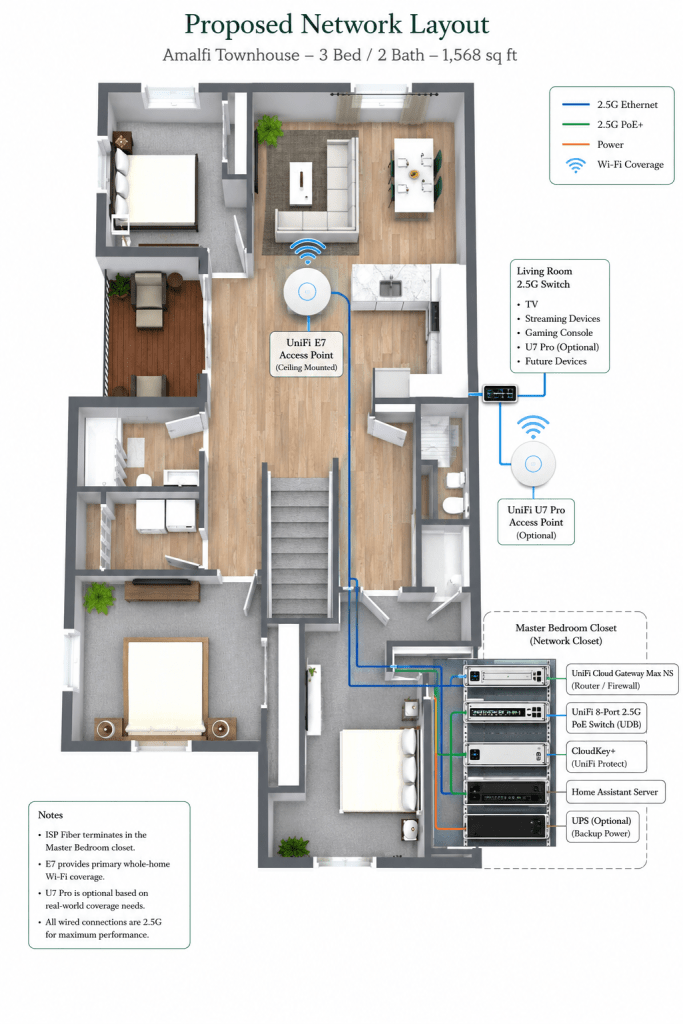
After several years in a larger house with multiple network closets, switches, access points, cameras, and wired devices spread across multiple floors, I moved from Colorado to Nebraska, and into a much smaller 1,568-square-foot townhouse due to a pending divorce. I am starting over with practically nothing, so I am taking this opportunity to upgrade everything I can. While the footprint is shrinking considerably, my expectations for networking performance aren’t.
So far, this move has been quite chaotic! The new place wasn’t cleaned and needed some repairs, but at least they are taking care of that this morning while I am at work. Also, the internet wasn’t fully setup as the ISP equipment was still registered to the previous tenant, and even when replacing it all in lieu of my UniFi equipment, I wasn’t getting anything to work correctly until I called about 6 times so they could reset the fiber modem’s port config. Anyway, at the moment, I am running my network off of the ISP-provided fiber modem and router, as going straight to my personal equipment from the modem hasn’t been working well. I hope to get this sorted out when my new 2.5G gateway arrives, removing the ISP-issued router completely, but if I have to use it, I will see if I can get it into bridge mode, disable the Wi-Fi network, or use it to broadcast my guest Wi-Fi network, and keep the UniFi networks separate from it.
At the new place, I opted for the 2GB internet, and have 2 pre-ran data lines to under the TV in the living room. The ISP connection is in the master bedroom closet, in a place perfect for a small network rack. I also have a UniFi bridge switch, which would give me the ability to connect more wired devices into it, and not needing a hardline to the device itself. So, without running more data lines, I can theoretically have 3 small 8-port switches throughout the place. My old trusty 48-port switch, and a lot of my other devices, are unfortunately now useless due to not having PoE++ ports, and the inability to pass 2.5G.
The new place came with some smart home devices already, including a Wi-Fi hub to control the already-installed smart lock at the front door and thermostat. I will see if I can get these devices synced up with my home assistant server soon.
The goal of this build is simple:
- Maintain full 2 Gbps fiber performance
- Preserve smart-home functionality
- Continue running Home Assistant and UniFi Protect
- Reduce hardware complexity
- Keep everything clean, efficient, and easy to manage
This project also gives me an opportunity to test one of UniFi’s newest gateways: the UniFi Cloud Gateway Max NS, which should arrive today.
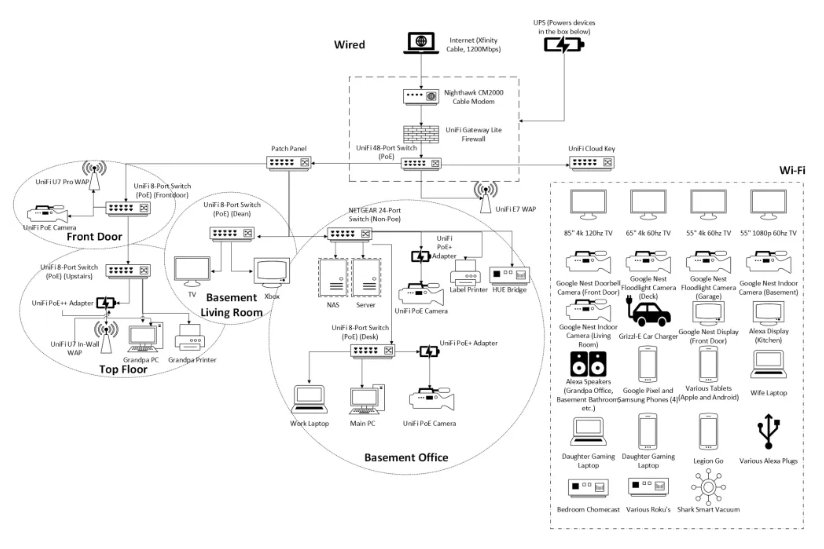
Looking Back: The Old Network
My previous home network was built around a philosophy of “wire everything possible.”
The setup included:
- UniFi Gateway/Firewall
- Multiple UniFi PoE switches (6 I believe)
- Several wired access points
- Dedicated camera infrastructure
- NAS storage
- Home server
- Home Assistant server (with tons of sensors)
- Multiple smart displays
- Gaming PCs
- Streaming devices
- Smart home hubs
- UniFi and Google Nest cameras
- Etc.
Every floor had dedicated switching and wireless coverage. While the network was incredibly reliable, it was designed for a much larger home with more physical separation between devices. Coverage was excellent, but honestly, it was more network than a townhouse requires.
The New Home
The new townhouse is an Amalfi floorplan at Allora168.
Specifications:
- 3 Bedrooms
- 2 Bathrooms
- 1,568 Square Feet
- Attached Garage
- Open-concept kitchen and living room
- 2 Gbps Fiber Internet
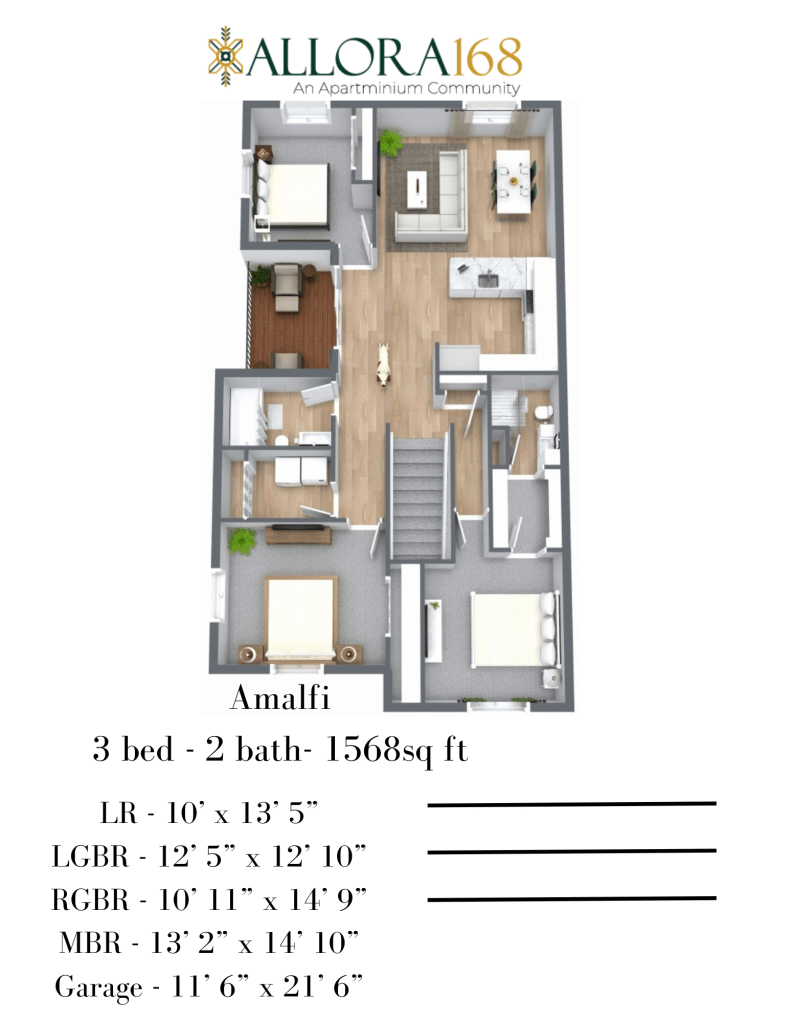
One major advantage is that the ISP handoff terminates directly inside the master bedroom closet. For networking enthusiasts, this is basically a built-in mini network closet. Instead of running equipment throughout the house, nearly all infrastructure can be centralized in a single location.
Design Goals
When planning the new build, I wanted to achieve several things:
Simplicity
The old house required multiple switching locations and numerous access points. The townhouse allows for a much cleaner design.
Full 2 Gbps Performance
The ISP provides a 2 Gbps fiber connection. The network core needs to support multi-gig routing and switching without bottlenecks.
Smart Home Integration
Home Assistant remains a critical component. Lighting, automation, notifications, presence detection, cameras, and future smart-home projects will continue to run locally.
Future Expansion
Even though the current footprint is smaller, I want room for:
- Additional cameras
- More IoT devices
- Additional wired connections
- Future multi-gig upgrades
Proposed Network Architecture
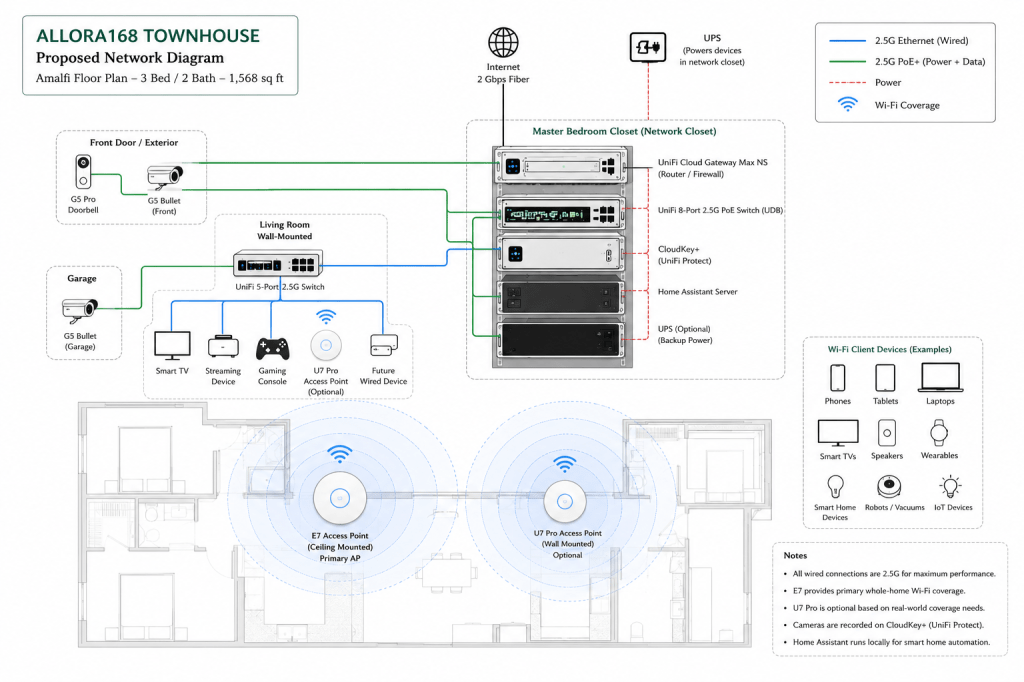
Network Closet (Master Bedroom Closet)
The master bedroom closet will serve as the central network rack.
Equipment:
UniFi Cloud Gateway Max NS
This becomes the heart of the network.
Responsibilities include:
- Routing
- Firewall
- IDS/IPS
- VLAN management
- UniFi Network Controller
The compact size makes it ideal for townhouse deployments where a full rack-mounted gateway isn’t necessary.
UniFi 2.5G PoE Switch
Connected directly to the Cloud Gateway Max NS.
This switch powers:
- UniFi E7 Access Point
- Cameras
- Additional network equipment
It also provides multi-gig connectivity throughout the core.
Home Assistant Server
My Home Assistant server remains local.
Services include:
- Device automation
- Presence tracking
- Voice integrations
- Camera notifications
- Energy monitoring
- Smart-home dashboards
Keeping Home Assistant local maintains reliability and minimizes cloud dependency.
Cloud Key+
Although the Cloud Gateway can run UniFi applications, I plan to continue using the Cloud Key+ for Protect recording.
Advantages:
- Dedicated Protect storage
- Separate recording workload
- Easier future expansion
UPS
A small UPS will provide backup power for:
- Gateway
- Switch
- Home Assistant
- Cloud Key+
This keeps critical services online during brief outages.
Wireless Coverage Strategy
One of the biggest changes from the old network is reducing the number of access points.
Primary Access Point: UniFi E7
The E7 will be installed centrally near the network closet.
Given the townhouse size and relatively open floorplan, it should easily cover:
- Living room
- Kitchen
- Master bedroom
- Secondary bedrooms
- Garage
The E7’s performance makes it somewhat overkill for a home this size—but that’s not necessarily a bad thing.
Benefits include:
- Exceptional 6 GHz performance
- Strong roaming support
- Future-proof Wi-Fi capacity
- Excellent multi-device handling
Secondary Access Point: UniFi U7 Pro (Optional)
The U7 Pro will likely be deployed in the living room. This depends on real-world testing after move-in.
Potential reasons to keep it:
- Additional 6 GHz coverage
- Stronger signal in secondary bedrooms
- Improved coverage in the garage
- Wireless redundancy
My expectation is that the E7 alone may be sufficient. However, running the U7 Pro gives flexibility if needed.
Living Room Distribution Point
A small wall-mounted 2.5G switch will be installed in the living room.
Connected devices include:
- Main television
- Streaming devices
- Gaming consoles
- U7 Pro (if deployed)
- Future wired devices
This keeps high-bandwidth devices off Wi-Fi whenever possible. For streaming and gaming, wired connections remain king.
Cameras and UniFi Protect
Camera coverage will be scaled back compared to the previous house.
Planned deployment:
- Front door camera
- Garage camera
- Interior coverage as needed
All recordings will be managed through:
- UniFi Protect
- Cloud Key+
The smaller footprint means fewer cameras can provide the same level of visibility.
Smart Home Ecosystem
A large portion of the previous home’s smart-home ecosystem is moving over.
Key platforms include:
- Home Assistant
- Google Nest devices
- Smart lighting
- Smart plugs
- Voice assistants
- Mobile integrations
Because everything is centralized through Home Assistant, moving to a smaller space actually simplifies automation logic. Fewer access points, fewer zones, and shorter distances generally improve reliability.
UniFi Cloud Gateway Max NS Review
The Cloud Gateway Max NS is one of the most interesting products UniFi has released for small-to-medium deployments.
What I Like
Multi-Gig Ready
With support for 2 Gbps internet and multi-gig switching, it fits perfectly into modern fiber deployments.
Compact Design
The form factor is ideal for apartments, townhomes, and small server closets.
Quiet Operation
Unlike larger rack-mounted gateways, the Cloud Gateway Max NS can disappear into a closet without becoming a noise source.
Integrated UniFi Experience
Management remains exactly what UniFi users expect:
- Centralized dashboard
- Excellent visibility
- Easy VLAN deployment
- Simple Wi-Fi management
Energy Efficient
For a network that will run 24/7, power efficiency matters. The Cloud Gateway Max NS provides enterprise-style functionality without enterprise-level power consumption.
Potential Downsides
Limited Expansion
Power users running large camera deployments or extensive switching may eventually outgrow it.
No Built-In PoE
A separate PoE switch is required.
For my deployment, this isn’t an issue since I already planned on running a dedicated multi-gig PoE switch.
Overall Verdict
For apartments, condos, townhouses, and smaller homes, the Cloud Gateway Max NS may be one of UniFi’s best products to date.
It delivers:
- Multi-gig routing
- Advanced firewall functionality
- UniFi simplicity
- Small footprint
All of this, without requiring a full rack-mounted solution.
Final Thoughts
This build represents a shift from “how much networking can I fit into a house?” to “how efficiently can I design a network?”
The townhouse may be smaller, but the goals remain the same:
- Fast internet
- Reliable Wi-Fi
- Smart-home automation
- Strong security
- Room to grow
The final network will likely consist of:
- UniFi Cloud Gateway Max NS
- UniFi 2.5G PoE Switch
- UniFi E7 Access Point
- UniFi U7 Pro (optional)
- Home Assistant Server
- Cloud Key+
- UniFi Protect/Google Nest Cameras
- Living Room 2.5G Switch
- UPS Backup
Compared to the old build, it is dramatically simpler.
Compared to a typical townhouse network, it will still be exceptionally capable.
Sometimes the best upgrade isn’t adding more hardware—it’s building exactly what you need.
Wish me luck for the build! I will document its journey in future posts.
Categories: Networks


