


I have been busy adding everything I can into my HomeAssistant setup and only have a few more items to complete. Currently, I am integrating my smart GE appliances (fridge, washer, dryer) into SmartHQ, GE’s application; I have them added to that app but adding it into HomeAssistant looks like it requires some extra steps. I did, however, locate a HACS integration on GitHub that I want to try this weekend. Our home’s water softener/purification system is also something that I would like to integrate, but its features are pretty limited; I can add it to Wi-Fi, and get sent email messages, so maybe need to either do something with that IP address or possibly use the email to send to HomeAssistant somehow. Next, we have a Grizzl-E electric car charger that I would like to view and control within my ecosystem, but I have been putting it off due to having to take the case apart to reconnect it to Wi-Fi.
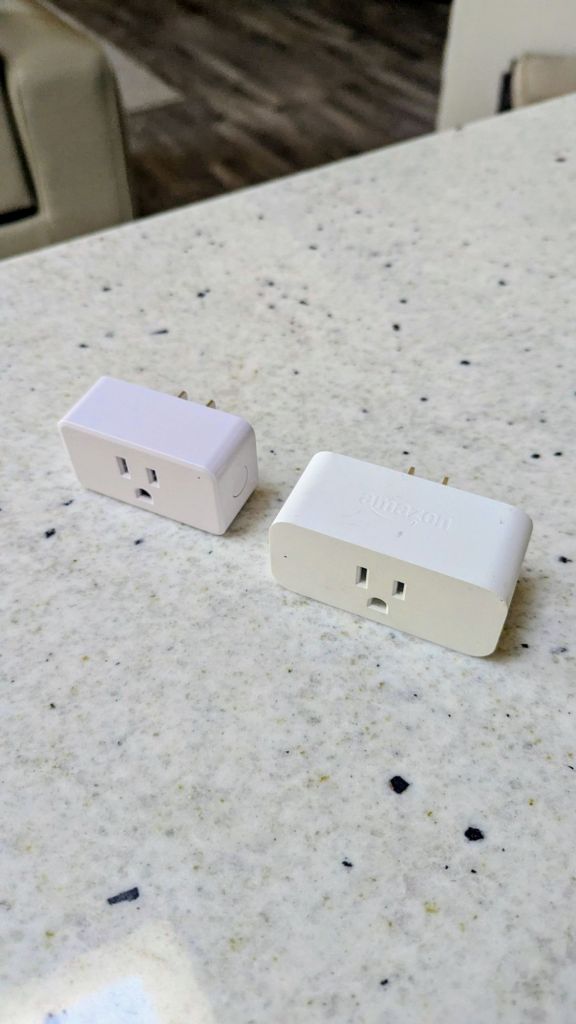
For my Zigbee network, I have been having issues with coverage to my garage door sensor due to not really having many repeaters near there. Since the whole house utilizes recessed lighting (not many lamps), smart bulbs near that location are not really possible. I did install some smart power outlets nearby, but every so often, the garage loses connection.
Here is my current Zigbee network as visualized within the system:
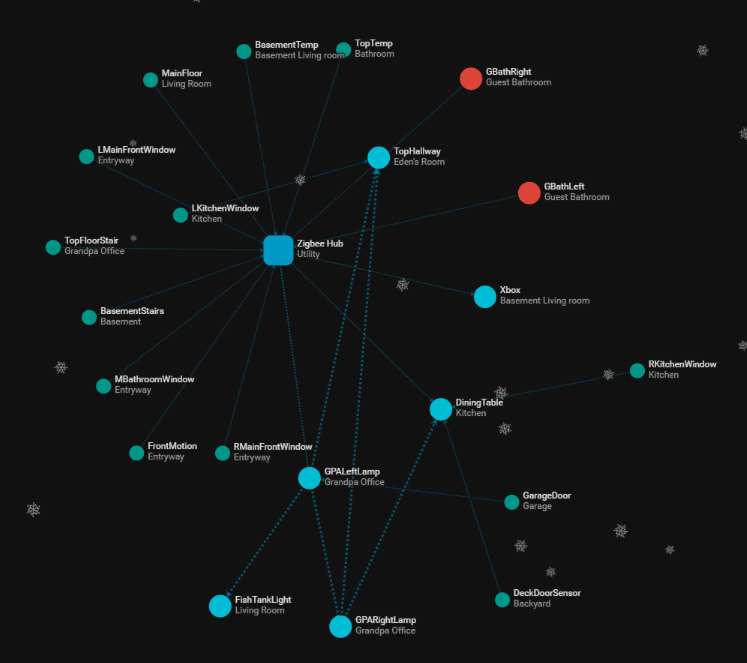
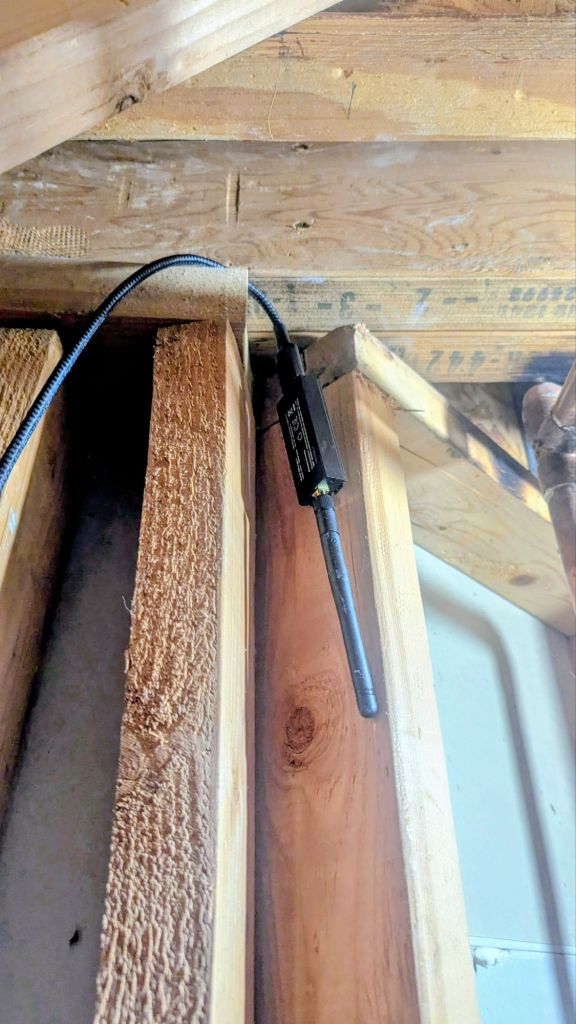
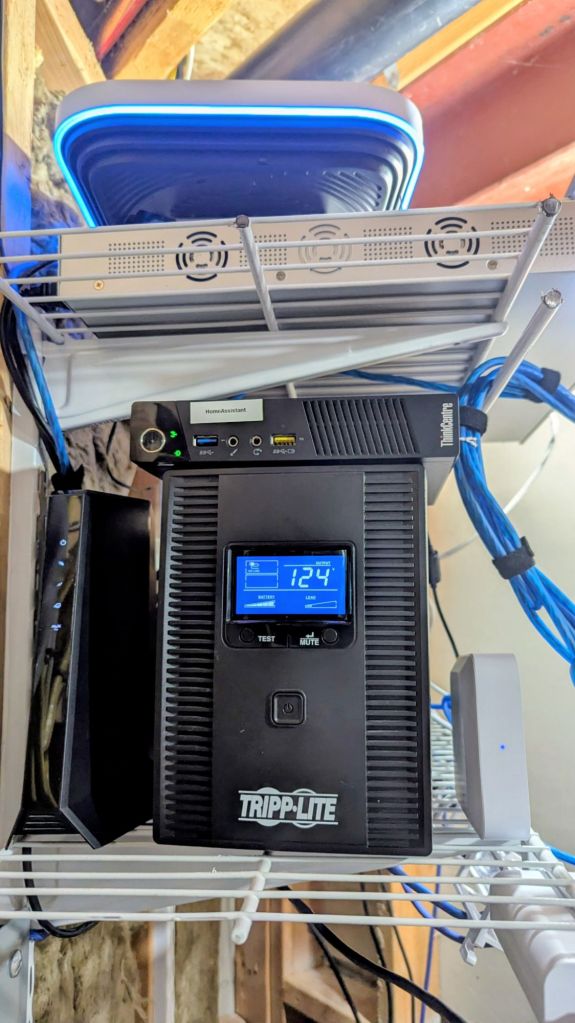
As you can see, I currently have excellent coverage, but some of the devices on the right drop occasionally. The two devices in red, GBathLeft/Right, are currently offline due to only having 2 out of 3 smart bulbs installed in the guest bathroom light fixture, thus having to keep them off manually. This weekend, I will try to move a smart bulb from my office to this spot to see if it helps (until I order more bulbs). I may also try to move my Zigbee USB dongle with an extender cable to a higher position in my utility room rack, possibly up the stairway so it is more in the center of the house. As you can see in the above diagram, the USB dongle can connect most of the devices, so maybe this will fix the problem. Another though I had was if I could install another USB dongle in the laptop I have running as a dashboard in my living room, but not sure if that would work.
I have begun creating automations, such as turning on lights in rooms via motion sensors, mobile device alerts on motion activity outside of my house and opening/closing windows and doors, fight tank lights and son’s Xbox turning on/off based on time, specific alerts on when doors or windows are left open for a specific amount of time, and some alerts based on temperature, smoke, and CO2 statuses. I still have a few more to tinker with, but I am at least starting get smart features out of my smart house now!
Now, lets dive into some setup tips for Zigbee networks, as well as how to get the most out of coverage.
Tips for enhancing Zigbee Networks
1. Optimize USB Dongle Placement (Huge Impact)
This is the #1 improvement you can make.
- Use a USB extension cable (1–3 ft / 30–100 cm)
- Moves the dongle away from:
- PC metal chassis
- USB 3.0 noise
- Power supplies
- Moves the dongle away from:
- Place the dongle vertically
- Most Zigbee antennas are optimized for vertical polarization
- Avoid walls, racks, and server closets
- Zigbee hates dense materials and metal
💡 If your coordinator is plugged directly into a Raspberry Pi or PC, you are losing range.
2. Choose the Best Zigbee Channel
Zigbee shares the 2.4 GHz band with Wi-Fi and Bluetooth.
Best Zigbee Channels (Least Wi-Fi Interference)
| Zigbee Channel | Frequency | Notes |
|---|---|---|
| 15 | 2425 MHz | Very good default |
| 20 | 2450 MHz | Often clean |
| 25 | 2475 MHz | Excellent, low Wi-Fi overlap |
| 26 | 2480 MHz | Max isolation, slightly lower power |
Avoid These
- Channels 11–14 → overlap Wi-Fi channels 1–6
- Channels 16–19 → overlap Wi-Fi channel 11
📌 If you’re on Wi-Fi channel 1 or 6, Zigbee 25 is usually ideal.
3. Build a Strong Zigbee Mesh (Critical for Speed)
Zigbee is a mesh network — speed and range scale with routers.
Add Zigbee Routers
Routers = mains-powered devices
- Smart plugs (best)
- In-wall switches
- Light bulbs (brand-dependent)
- Dedicated Zigbee repeaters
Best practice:
- One router every 20–30 feet (6–9 m)
- Place routers between coordinator and end devices
- Avoid daisy-chaining long hops
🚫 Battery devices do not repeat traffic.
4. Use Quality Zigbee Routers
Not all routers are equal.
Highly Reliable Repeaters
- IKEA TRÅDFRI plugs/repeaters
- Sonoff Zigbee plugs
- Philips Hue (with Hue hub or properly paired)
- ThirdReality smart plugs
Be Careful With
- Cheap bulbs (drop packets)
- Mixed Zigbee 3.0 + legacy ZHA 1.2 devices
- Bulbs used as routers for sensors (can cause latency)
5. Upgrade the USB Dongle Firmware
Firmware directly affects:
- Routing table size
- Packet throughput
- Stability
Recommended Chipsets
| Chipset | Notes |
|---|---|
| CC2652P | Excellent range, high TX power |
| EFR32MG21 | Very fast, modern |
| ConBee II | Stable, lower TX power |
📌 Always flash the latest stable coordinator firmware, not nightly unless needed.
6. Increase Network Stability (Indirect Speed Boost)
Speed often drops due to retries.
- Limit network size per coordinator
- ~50–70 devices is ideal
- Avoid frequent pairing/unpairing
- Let the network settle for 24–48 hours after changes
- Don’t power-cycle routers frequently
7. Reduce RF Noise
- Disable unused Bluetooth radios
- Move coordinator away from:
- USB 3.0 hubs
- SSD enclosures
- HDMI cables
- Use shielded USB cables
8. Coordinator Software Tuning
If using Home Assistant / Zigbee2MQTT / ZHA:
Zigbee2MQTT
- Enable:
experimental: true(for newer routing improvements)
- Monitor:
- LQI (Link Quality Indicator)
- Route tables
ZHA
- Prefer:
- “EZSP” for EFR32
- “ZNP” for CC2652
- Avoid mixing coordinator types after setup
9. When to Add Another Coordinator
If you need:
- Large homes (>3,000 sq ft / 280 m²)
- Multiple floors with concrete
- 70 devices
➡ Add a second Zigbee network (not a repeater)
- Separate PAN + channel
- Use different USB dongle
- Bind devices locally when possible
Next Projects
Next up, I would like to get a temperature sensor in every room, a smoke/Co2 detector in every floor, a few more door/window sensors for the master bedroom on the main floor (somewhat ground-accessible) and front/garage doors, as well as, one day, replacing the recessed ceiling LED lighting throughout the house to smart bulbs. I found some smart night lights as well that would be great for both stairways, and I could get them to turn on based on motion. I also need to redo my robot vacuum’s connection to HomeAssistant as it is getting errors now, as well as getting the abovementioned smart GE appliances into the ecosystem. Just when I think this project is done, more avenues of improvement are discovered. Never stop tinkering!
Categories: Networks


 Securing The Universe