


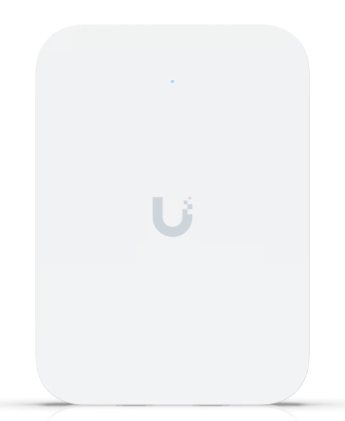
As I have discussed in past posts, I have been patiently waiting to upgrade my home’s current NETGEAR NIGHTHAWK mesh Wi-Fi setup to a full UniFi system. I have already switched over my office to full UniFi equipment, so the last pieces I need to source are 3-4 UniFi WAPs. So, after many weeks of research, I decided to get a few of the UniFi U7 In-Walls to replace each of my current NIGHTHAWK WAPs, and the first one just arrived for testing! So, let’s dive into some of my first impressions on the product.
The UniFi U7 In-Wall Access Point (AP) is Ubiquiti’s latest innovation, designed to seamlessly integrate high-speed Wi-Fi 7 connectivity into environments where aesthetics and space are paramount. Unlike traditional ceiling-mounted APs, the U7 In-Wall is engineered for wall installation, making it an ideal choice for residential settings, hotels, and offices seeking unobtrusive yet powerful wireless solutions.
Key Features and Differentiators:
- Design and Installation: The U7 In-Wall’s wall-mounted design allows it to blend seamlessly into any room, eliminating the need for ceiling installations. This is particularly beneficial in settings where ceiling mounting is impractical or undesirable.
- Advanced Wi-Fi 7 Technology: Equipped with six spatial streams and 6 GHz support, the U7 In-Wall leverages the latest Wi-Fi 7 advancements to deliver enhanced speed and capacity.
- Multi-Link Operation (MLO): This feature enables the AP to maintain multiple simultaneous connections across different frequency bands, optimizing performance and reliability.
- Seamless Integration: Designed to work harmoniously within the UniFi ecosystem, the U7 In-Wall offers centralized management and monitoring through the UniFi Network Application.
Performance Comparison: UniFi U7 In-Wall vs. Netgear Nighthawk Mesh System (MR80 and MS80):
When comparing the U7 In-Wall to Netgear’s Nighthawk Mesh System, several distinctions emerge:
- Installation and Aesthetics: The U7 In-Wall’s flush, wall-mounted design offers a discreet appearance, whereas the Nighthawk system consists of standalone units that may be more conspicuous.
- Technology: The U7 In-Wall utilizes Wi-Fi 7 technology, providing higher potential speeds and improved efficiency over the Wi-Fi 6-based Nighthawk MR80 and MS80.
- Performance: Users have reported that the U7 In-Wall delivers excellent speed and coverage, effectively serving entire homes, including challenging areas like garages.
Use Cases:
The U7 In-Wall is particularly suited for:
- Residential Deployments: Providing robust Wi-Fi coverage without compromising interior design.
- Hospitality Industry: Offering guests reliable high-speed internet access with minimal visual impact.
- Office Environments: Ensuring seamless connectivity in spaces where ceiling installations are not feasible.
Setup Instructions:
- Physical Installation: Mount the U7 In-Wall AP onto a standard electrical outlet box using the provided hardware. Ensure that the location has appropriate Ethernet cabling and power availability.
- Powering the Device: The U7 In-Wall supports Power over Ethernet (PoE+). Connect it to a PoE+ switch or use a PoE+ injector to supply power.
- Configuration: Utilize the UniFi Network Application to adopt and configure the AP. This platform allows for comprehensive management of network settings, SSIDs, security protocols, and more.
Speed and Range Tests:
I only had a short time before work this morning to play with the In-Wall, but in my office, I normally get around 500 Mbps download speeds on average on existing equipment, with the In-Wall, I averaged around 700Mbps but had many instances where I was getting a full +1Gb down.
I will have to play around with everything to see what the range is, but I was getting close to the above speeds no matter where I was in my basement floor where my office is, providing better coverage than my NIGHTHAWK WAP which was even nearer to me.
Additional Considerations:
- Heat Management: Some users have observed that the U7 Pro Wall APs can become quite warm during operation. Ensuring proper ventilation and adhering to recommended installation guidelines can help mitigate potential heat-related issues.
I will also pick up 3 U7 In-Wall Table Stands for $39 each, as each U7 In-Wall will be mounted on a flat surface.


Conclusion:
The UniFi U7 In-Wall Access Point represents a significant advancement in delivering high-performance Wi-Fi 7 connectivity within a sleek, wall-mounted design. Its ability to integrate seamlessly into various environments, coupled with the robust features of the UniFi ecosystem, makes it a compelling choice for those seeking both aesthetics and performance in their wireless networking solutions.
I find the design of the In-Wall to be perfect for my use case, offering a slim package to be installed on locations other than the ceiling. Now to source the rest of the parts! Wish me luck.
Categories: Reviews


 Securing The Universe